
• News
    • Bitcoin
    • Altcoins
    • Blockchain
    • DeFi
    • Regulation
    • Scams
  • NFT
  • Metaverse
  • Analysis
  • Learn
  • Videos
  • Blogs
  • Market Cap
  • Shop
What's Hot

Bitcoin Investors…What Just Happened?

2026-01-04

📉Cycle Collapse: 1.4M BTC Vanish, Whales Accumulate & History Rhymes 🏦🐳

2026-01-02

This One Thing Will CRASH the Silver Market Again

2026-01-02

Subscribe to Updates

Get the latest creative news from FooBar about art, design and business.

Facebook Twitter Instagram
Crypto Investor News Network
  • News
    • Bitcoin
    • Altcoins
    • Blockchain
    • DeFi
    • Regulation
    • Scams
  • NFT

    Bitcoin Just Hit an All-Time High. Nobody Cares

    2025-09-11

    All Eyes on Art: Upcoming Collections to Watch the Week of May 27

    2025-09-11

    Bitcoin Vegas Belongs to the Suits Now

    2025-09-11

    NFC Summit Lisbon Founder on Evolving the Event and Weathering the Market

    2025-09-11

    All Eyes on Art: Upcoming Collections to Watch the Week of June 3

    2025-09-10
  • Metaverse

    Shib: The Metaverse – Part of the Expanding Shiba Inu Ecosystem

    2025-01-03

    Experience to Earn: Everdome’s Metaverse Frontier

    2024-12-30

    Beyond Bots: Meta Motivo and the Dawn of Humanlike Digital Life

    2024-12-13

    Exploring NetVRk: What Is Behind This AI-Driven Virtual Universe?

    2024-10-28

    Council of Europe Highlights Metaverse’s Impact on Privacy and Democracy

    2024-09-05
  • Analysis

    Crypto Exchange Coinbase Lists New DeFi Altcoin Project Built on Base Blockchain

    2023-12-13

    Ethereum Price Bears Keep Pushing, Why Decline Isn’t Over Yet

    2023-12-13

    Trader Bullish on Cosmos (ATOM), Says One Dogecoin Rival Setting Up for Next Leg Up – Here’s His Outlook

    2023-12-13

    AVAX Price Pumps 50% and Dumps 15%, Why Uptrend Is Still Strong

    2023-12-13

    Top Trader Predicts Parabolic Rally for Solana Competitor – Here’s His Upside Target

    2023-12-13
  • Learn

    Changelly Partners With Transak to Streamline Buying Crypto

    2025-12-30

    What is SocialFi and How Is It Changing Social Media?

    2025-12-20

    What Is PayFi? The Simple Guide to Payment Finance and Web3 Banking

    2025-12-19

    What Is TradFi? A Beginner’s Guide to Traditional Finance

    2025-12-18

    Spot Key Trends, Top Sectors, and Early Market Signals

    2025-12-17
  • Videos

    Bitcoin Investors…What Just Happened?

    2026-01-04

    📉Cycle Collapse: 1.4M BTC Vanish, Whales Accumulate & History Rhymes 🏦🐳

    2026-01-02

    This One Thing Will CRASH the Silver Market Again

    2026-01-02

    Bitcoin Whales Are Loading Up Right NOW

    2026-01-02

    The 4 Year Cycle Is DEAD!! What It Means For Crypto In 2026!!

    2026-01-02
  • Blogs
  • Market Cap
  • Shop
Facebook Twitter Instagram TikTok
Crypto Investor News Network
Home»NFT»A Guide to the Latest Tools and Features
NFT

A Guide to the Latest Tools and Features

2023-06-23No Comments5 Mins Read
Facebook Twitter Pinterest LinkedIn Tumblr Email
Share
Facebook Twitter LinkedIn Pinterest Email

On June 22, Midjourney announced the rollout of version 5.2 of its text-to-image AI model via Twitter. The latest update to the program since the company announced the release of V5.1 in May, V5.2 comes with some fun updates and toys that AI art lovers are already experimenting with in highly creative ways. The upgrade can produce some seriously impressive results, but like any tool, it works best when you have an idea of its capabilities and limits.

If you’re unfamiliar with how to use Midjourney in general, head over to our guide on the image generation program first before diving in below. Here’s everything you need to know about the V5.2 model and its new suite of tools.

Zoom Out tool

If you want to play around with V5.2, you don’t need to do anything to set it up; the model updates have been automatically loaded to your user settings and will take effect the moment you put in a prompt. The first feature we’ll look at is Midjourney’s Zoom Out function.

Similar to Adobe’s Generative Fill tool, the zoom feature allows users to expand upon an original image, broadening its scope to a wider scale while keeping the details of the original image the same. After inputting a prompt via the “/image” command, Midjourney will kick out four visual iterations in a grid based on the user’s input. They may then “upscale” the particular image they like the most, rendering it in higher detail.

We’re testing V5.2 today, it includes improved aesthetics, coherence, text understanding, sharper images, higher variation modes, zoom-out outpainting, and a new /shorten command for analyzing your prompt tokens. Enjoy!

— Midjourney (@midjourney) June 22, 2023

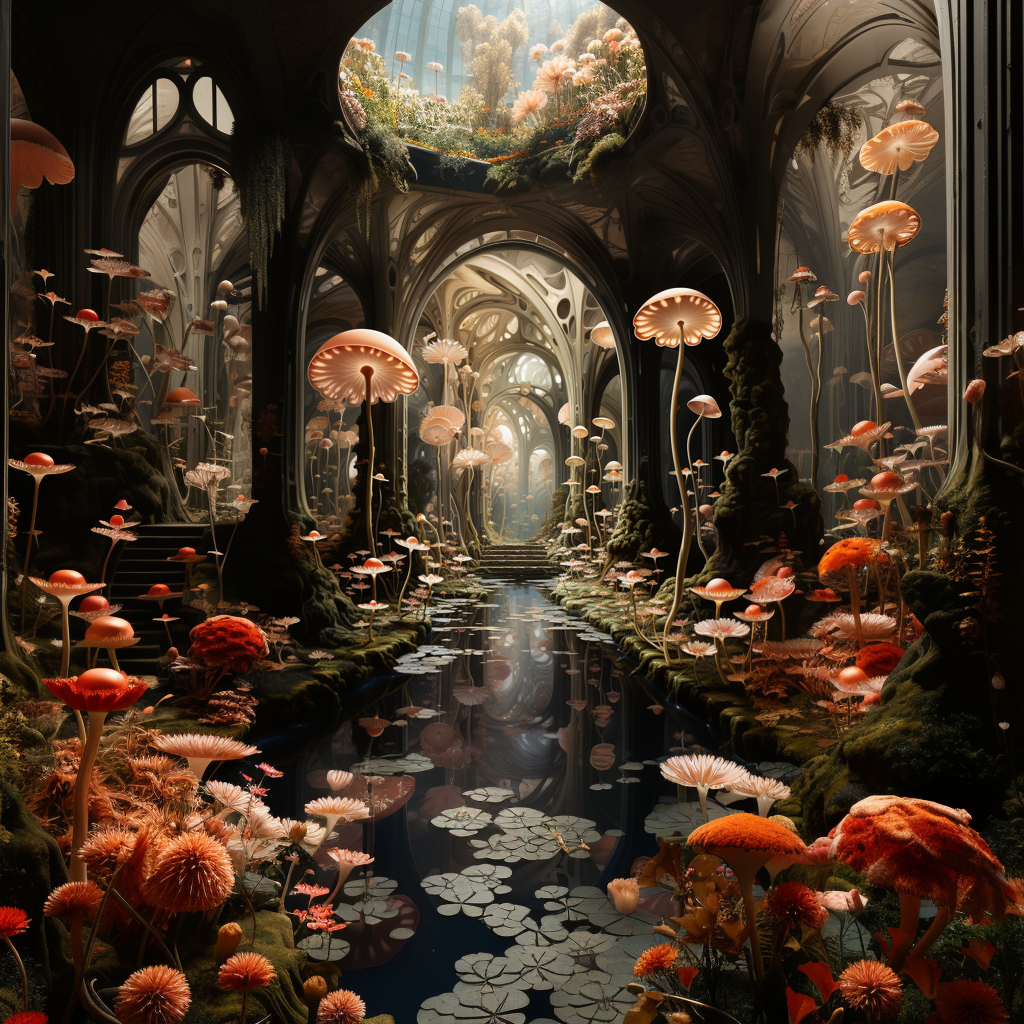
From here, users will now see three buttons underneath the upscaled image labeled “Zoom Out 2x,” “Zoom Out 1.5x,” and “Custom Zoom.” While the first two will zoom the original scene out to two and one-and-a-half times the scale of the original image, respectively, “Custom Zoom” will allow you to fine-tune that ratio (via a simple, manual prompt edit) to anything between 1.0 and 2.0. If you go higher than 2.0 with your prompt, Midjourney will return an error message instructing you to keep the figure between those two values.

See also  Fantom: FTM Price Potential & BIG Updates - The Latest!!

The fun thing to play with here is the potentially endless zooming options. If you zoom out on your output, you can then take that upscaled image and reapply the Zoom Out 1.5/2x feature as much as you want, and it will continue to build on your ever-expanding image.
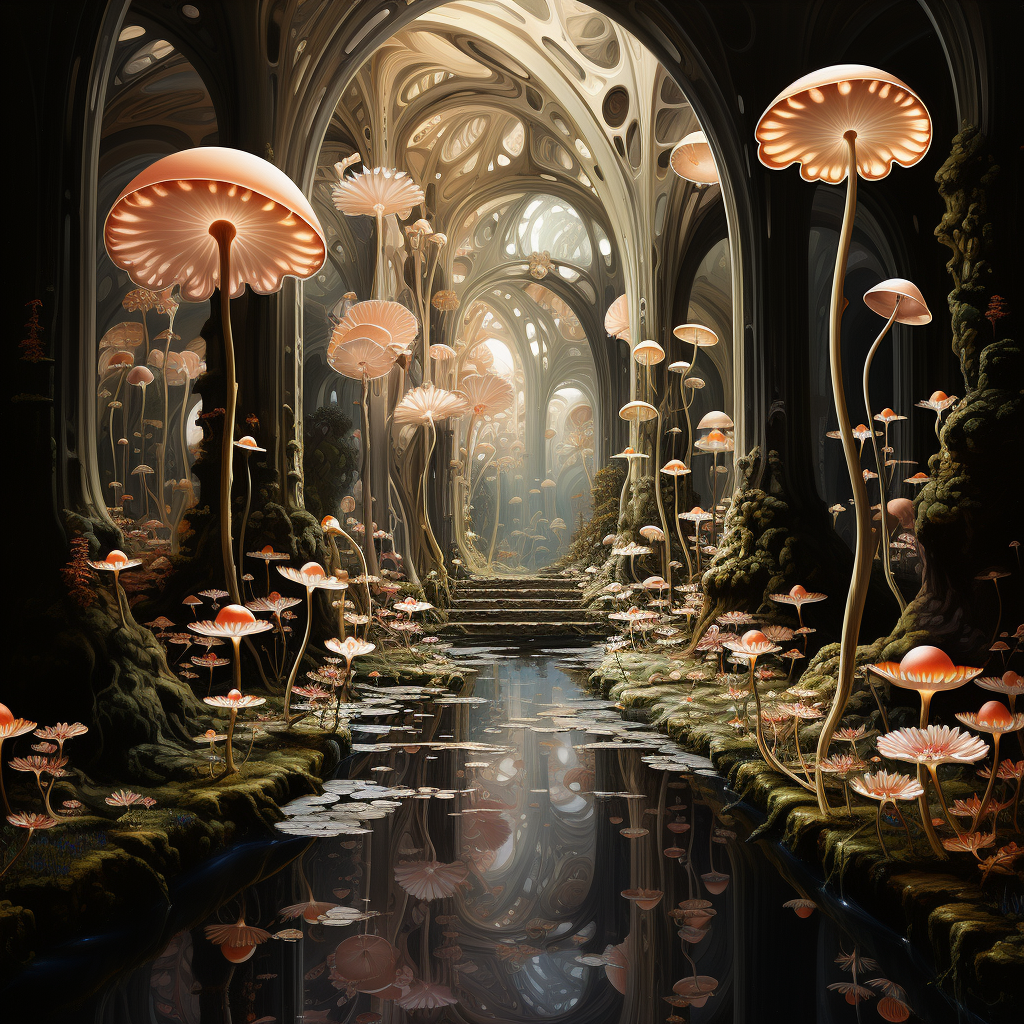
Midjourney V5 Normal Upscale. Credit: Midjourney/nft now
Midjourney V5 Zoom 2x. Credit: Midjourney/nft now

Expanding on an existing image to create a visually coherent environment is a great way for creatives to take their ideas to another level. The Twitterverse has been gushing over the release since it dropped, with many individuals sharing their ideas on how creatives might be able to utilize the updated model, including using image interpolation and edits in software like Final Cut Pro to create some compelling visuals that border on featuring an infinite-zoom aesthetic.

Make Square feature

The update also comes with a “Make Square” tool, which alters the shape of images made in an aspect ratio other than a perfect square form. Landscape images (made with the ending prompt command of –ar 16:9) can be expanded vertically using the tool and vice-versa. Look for the arrows next to the “Make Square” button, which indicate in which direction the resizing will occur.


Original image output with an aspect ratio of 16:9. Credit: Midjourney/nft now
Squared image. Credit: Midjourney/nft now

Variation Mode

Midjourney V5.2 also comes with a new feature called “Variation Mode” that essentially allows users to hone in on the kind of visual nuance and change they want to apply to their outputs. Use the prompt command “/settings” to set this feature to either “High Variation Mode” or “Low Variation Mode.” High variation leads to a slightly greater visual diversion from the original output, which may lead to more interesting or exploratory results while keeping the setting low will tend to allow for greater visual consistency.

See also  OKX Wallet Revolutionizes DeFi Access with Latest SOFA.org Integration

The examples below utilized the same visual seed and prompt, with the left outputs originating from a “low variation” and the right set to “high.”


Low variation. Credit: Midjourney/nft now
High variation. Credit: Midjourney/nft now

Midjourney also now offers a more localized version of this feature when upscaling an image, allowing you to “Vary (Strong)” or “Vary (Subtle)” a single output. This is similar in feature to Variation Mode, but it allows you to apply the tool in specific instances without broadcasting its effects to all of your work. If you’re looking to really do some experimenting, combine “High Variation Mode” with “Vary (Strong)” for the best results.
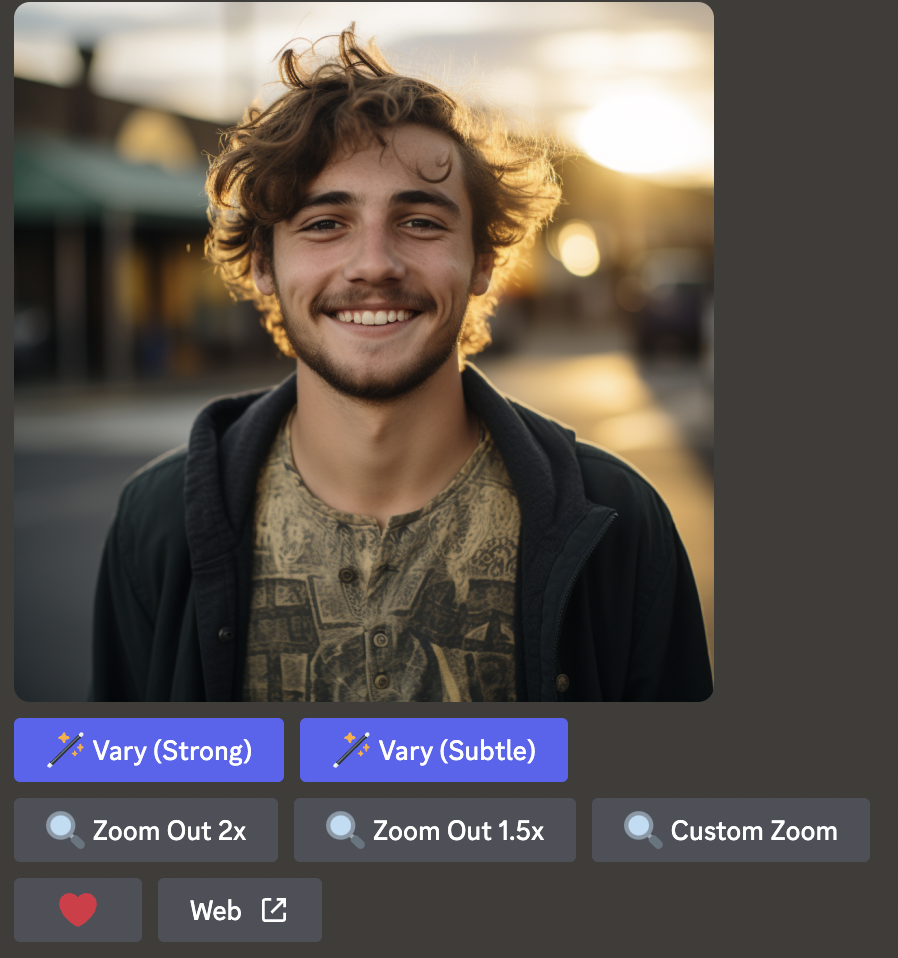
Credit: Midjourney/nft now

Shorten command

One of the biggest misconceptions about Midjourney is that if you use more words in your prompt, you will automatically see better or more detailed results. While creating detailed prompts can result in more appealing outputs, more often than not, overly verbose prompts negate the impact of each individual word, resulting in blasé outputs that are less likely to match what you had in mind.

One useful way to get around this is to use Midjourney’s “Shorten” command. Simply type “/shorten” and insert your wordy prompt. Midjourney will analyze its components and suggest a few alternatives for you to use.
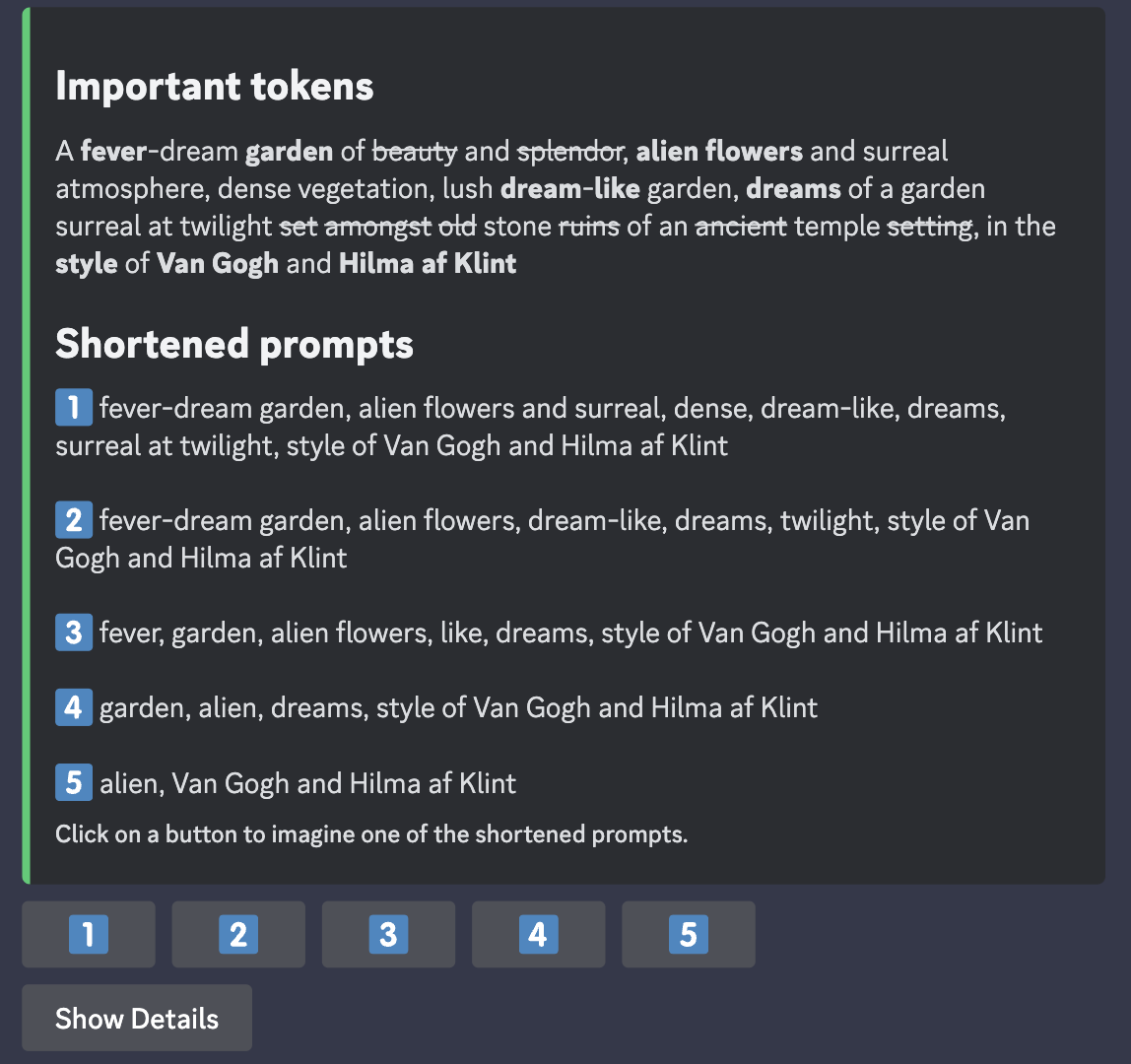
Credit: Midjourney/nft now

Stylize

Midjourney is trained to create images that have an artistic flash and lush visual aesthetic, which is one of the things that sets it apart from programs like Stable Diffusion. One of the ways users can lean into this effect is by using the “Stylize” function. While users were previously able to add “–stylize X” to the end of their prompts (with figure X ranging anywhere from 0-1000), V5.2 has taken the model’s existing stylize capabilities and turned them up to 11 in terms of realism and flair. Here are just some of the images people are making using the new model.

See also  How To Buy Crypto on Changelly via Unlimit Crypto – A Step-by-Step Guide – Cryptocurrency News & Trading Tips – Crypto Blog by Changelly

Features Guide Latest Tools
Share. Facebook Twitter Pinterest LinkedIn Tumblr Email

Related Posts

What Is PayFi? The Simple Guide to Payment Finance and Web3 Banking

2025-12-19

What Is TradFi? A Beginner’s Guide to Traditional Finance

2025-12-18

What Is Litecoin (LTC)? A Guide to Crypto’s “Digital Silver”

2025-12-16

What Is a Crypto Wallet Address? A Beginner’s Guide

2025-12-06
Add A Comment

Leave A Reply Cancel Reply

Top Posts
Videos

What Happens If They Close All Bitcoin Exchanges?

2024-05-07

Join the private Bitcoin forum: https://www.bitcoinuniversity.com/bitcoin-forum In this video, I discuss how one could continue…

DeFi

Solana DeFi Protocol Kamino Sets KMNO Token Airdrop for April

2024-03-07

Kamino is the latest Solana-based DeFi protocol to set an airdrop date. Seven percent of…

Videos

Bitcoin’s Next Crash: The Price Where I’m Buying EVERYTHING

2025-05-29

FREE NEWSLETTER: https://www.learningcrypto.com/ SHOP: https://shop.learningcrypto.com 🕊️ SECOND CITIZENSHIPS: …

Subscribe to Updates

Get the latest news and Update from CINN about Crypto, Metaverse and NFT.

Editors Picks

Bitcoin Investors…What Just Happened?

2026-01-04

📉Cycle Collapse: 1.4M BTC Vanish, Whales Accumulate & History Rhymes 🏦🐳

2026-01-02

This One Thing Will CRASH the Silver Market Again

2026-01-02

Bitcoin Whales Are Loading Up Right NOW

2026-01-02
Crypto Investor News Network
Facebook Twitter Instagram TikTok
  • Contact
  • Terms & Conditions
  • Privacy Policy
  • DMCA
  • Disclouser
© 2026 - All rights are reserved.

Type above and press Enter to search. Press Esc to cancel.

bitcoin
Bitcoin (BTC) $ 92,944.00
ethereum
Ethereum (ETH) $ 3,168.56
tether
Tether (USDT) $ 0.99939
xrp
XRP (XRP) $ 2.13
bnb
BNB (BNB) $ 902.53
solana
Solana (SOL) $ 135.54
usd-coin
USDC (USDC) $ 0.999839
staked-ether
Lido Staked Ether (STETH) $ 3,166.44
tron
TRON (TRX) $ 0.292231
dogecoin
Dogecoin (DOGE) $ 0.147051